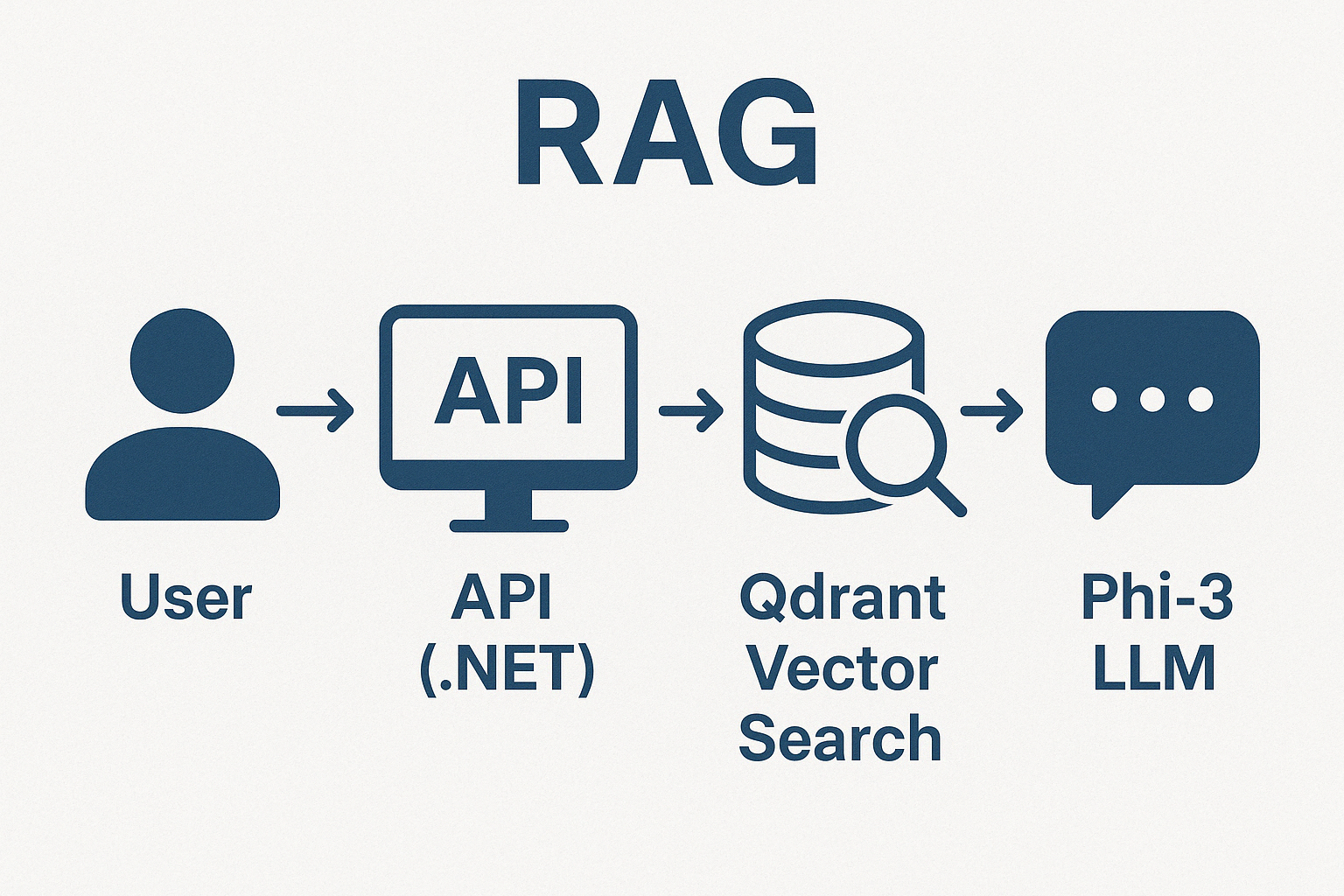
Learn how to build a powerful RAG (Retrieval-Augmented Generation) API using .NET, Microsoft Semantic Kernel, Phi-3, and Qdrant. Combine your private e-commerce data with LLMs to create smarter, grounded responses. Simple and easy step-by-step!
Introduction
In previous articles we explored the power of Phi-3 for image analysis and automating e-commerce product descriptions. Now, let’s take it one step further by building a RAG API using .NET, Semantic Kernel, Phi-3, and Qdrant.
With RAG, we can enrich LLM-generated responses by feeding them up-to-date and domain-specific data — in this case, product information from our e-commerce store (as a sample).
What is Retrieval-Augmented Generation (RAG)?
RAG is a method where, before answering a question, a system retrieves relevant documents or data and provides them as context to the LLM. This way:
✅ LLMs generate more accurate, grounded, and specific responses.
✅ We mitigate hallucinations.
✅ We combine private data with powerful LLM reasoning.
What Are Vector Databases?
When we talk about RAG, we also have to talk about vector databases, which store data as vectors instead of rows and columns. They enable fast similarity searches based on semantic meaning.
Unlike a relational model (SQL) where queries must follow a specific syntax, in a vector database searches are performed by comparing the proximity between vectors, meaning how close they are to each other in a multidimensional space. This makes it possible to find relevant information even if it doesn’t literally match the search terms, since it is based on context and meaning.
To better illustrate the difference between traditional relational databases and vector databases, consider the following example:
SQL vs Vector DBs:
- SQL:
SELECT * FROM products WHERE name = 'Yoga Mat' - Vector DB: Find products similar to «equipment for yoga»
In the SQL example, the query retrieves only those records where the product name exactly matches «Yoga Mat.» In contrast, a vector database interprets the meaning behind the query «equipment for yoga» and retrieves products that are contextually similar, such as yoga mats, yoga blocks, or even yoga straps, offering a much more flexible and intelligent search experience.
Given the importance of vector databases in RAG systems, choosing the right one becomes crucial. One popular option is Qdrant, a high-performance vector database designed specifically for AI applications. It offers several advantages that make it particularly well-suited for retrieval-augmented generation scenarios:
Why Qdrant?
✅ Semantic similarity search.
✅ Fast and scalable.
✅ Easy Docker deployment.
✅ Native support for AI use cases.
With Qdrant, you can efficiently perform semantic searches, scale to handle large datasets, and deploy quickly using Docker containers. Its design focuses on the needs of AI-driven applications, making it an excellent choice for projects that involve natural language processing, recommendation systems, or intelligent search features.
To perform semantic searches in a vector database like Qdrant, we first need to represent our data in a way that captures its meaning rather than just its literal form. This is where embeddings come into play.
What Are Embeddings?
Embeddings are mathematical representations of data — like words, sentences, or product descriptions — in a multi-dimensional space. Each item is transformed into a vector of numbers, where similar meanings are located close together.
In simple terms:
- Embeddings capture the semantic meaning of content.
- Similar ideas have closer vectors.
For example:
- The embedding for «Running Shoes» will be closer to «Athletic Footwear» than to «Kitchen Table».
Why do we use embeddings in this example?
- We want to find products related to the user’s question, even if they don’t use the exact same words.
- Embeddings allow semantic search over product descriptions.
- Qdrant stores these embeddings, making it possible to quickly retrieve the most relevant items.
Without embeddings, we would be stuck doing basic keyword matching, missing the real «meaning» behind user queries.
Setting Up the Environment
Now that we have a good understanding of the key concepts, it’s time to get hands-on and start building. In this section, we’ll set up the environment needed to work with embeddings, a vector database, and integrate everything into a basic RAG pipeline.
✅ .NET 8 SDK
✅ Docker for Qdrant
✅ Semantic Kernel + SLM-Local (for ONNX models)
✅ Phi-3 Mini 4K Instruct ONNX
Run Qdrant:
docker run -p 6333:6333 -p 6334:6334 qdrant/qdrant
Once docker container is up and running you can check that it’s working navigating to:

Create Project:
dotnet new webapi -n RAGEcommerce
cd RAGEcommerce
Install Packages:
dotnet add package Microsoft.SemanticKerneldotnet add package Microsoft.SemanticKernel.Connectors.Onnxdotnet add packageMicrosoft.SemanticKernel.Connectors.Qdrant
📊 Application Architecture

- API Layer:
/health,/api/rag/init,/api/products,/api/rag/query - Service Layer:
ProductCatalogService,EmbeddingService - Infrastructure Layer:
QdrantIndexer,ChatService - External Systems:
Qdrant,Semantic Kernel,Phi-3 (ONNX Runtime)
🛠️ Code
You can find code also in the Github repo.
📄 Program.cs
using Microsoft.SemanticKernel;
using Qdrant.Client;
using RAGEcommerce.Infrastructure;
using RAGEcommerce.Models;
using RAGEcommerce.Services;

var builder = WebApplication.CreateBuilder(args);

builder.Services.AddOpenApi();
builder.Services.AddEndpointsApiExplorer();
builder.Services.AddSwaggerGen();

builder.Services.AddSingleton(_ => new QdrantClient("localhost"));

builder.Services.AddSingleton<Kernel>(_ =>
{
    var modelPath = @"C:\phi-3\models\Phi-3-mini-4k-instruct-onnx\cpu_and_mobile\cpu-int4-awq-block-128";

#pragma warning disable SKEXP0070
    var kernel = Kernel.CreateBuilder()
        .AddOnnxRuntimeGenAIChatCompletion("phi-3", modelPath)
        .Build();
#pragma warning restore SKEXP0070

    return kernel;
});

builder.Services.AddSingleton<EmbeddingService>();
builder.Services.AddSingleton<QdrantIndexer>();
builder.Services.AddSingleton<ChatService>();
builder.Services.AddSingleton<ProductCatalogService>();

var app = builder.Build();

app.UseSwagger();
app.UseSwaggerUI(c => {
    c.SwaggerEndpoint("/swagger/v1/swagger.json", "RAGEcommerce API v1");
    c.RoutePrefix = string.Empty;
});

if (app.Environment.IsDevelopment())
    app.MapOpenApi();

app.UseHttpsRedirection();

app.MapGet("/health", async (QdrantClient qdrantClient) => {
    var health = await qdrantClient.HealthAsync();
    return Results.Ok($"Status: {health}");
});

app.MapPost("/api/rag/init", async (ProductCatalogService productService, QdrantIndexer indexer) => {
    await indexer.IndexProductsAsync();
    return Results.Ok($"Initialized {productService.GetAllProducts().Count} products.");
}).WithName("Initialize").WithOpenApi();

app.MapGet("/api/products", (ProductCatalogService productService) =>
    productService.GetAllProducts()).WithName("GetProducts").WithOpenApi();

app.MapPost("/api/rag/query", async (UserQuery userQuery, QdrantClient qdrantClient,
    EmbeddingService embeddingService, ChatService chatService) => {

    var embedding = embeddingService.GenerateEmbedding(userQuery.Question);
    var results = await qdrantClient.SearchAsync("products", embedding, limit: 3);

    var context = results.Any()
        ? string.Join("\n", results.Select(r => r.Payload["name"].ToString()))
        : "No matching products found.";

    var prompt = $"Using the following context:\n{context}\nAnswer the question:\n{userQuery.Question}";
    var answer = await chatService.GetChatResponseAsync(prompt);

    return Results.Ok(answer);
}).WithName("QueryProduct").WithOpenApi();

app.Run();
Models
📄Product.cs
public class Product
{
    public int Id { get; set; }
    public string Name { get; set; }
    public string Description { get; set; }
}📄UserQuery.cs
public class UserQuery
{
    public string Question { get; set; }
}
Services
📄ProductCatalogService.cs
public class ProductCatalogService
{
    private readonly List<Product> products =
    [
        new Product
            { Id = 1, Name = "Running Shoes", Description = "Lightweight shoes for running." },

        new Product
            { Id = 2, Name = "Hiking Boots", Description = "Durable boots for mountain trails." },

        new Product { Id = 3, Name = "Yoga Mat", Description = "Non-slip mat for yoga practice." },
        new Product
        {
            Id = 4, Name = "Fitness Tracker",
            Description = "Wearable device to monitor health and activity."
        },

        new Product
        {
            Id = 5, Name = "Water Bottle",
            Description = "Insulated bottle for keeping drinks cool during workouts."
        },

        new Product
        {
            Id = 6, Name = "Resistance Bands",
            Description = "Set of bands for strength training exercises."
        },

        new Product
        {
            Id = 7, Name = "Cycling Helmet",
            Description = "Protective helmet designed for cycling safety."
        }
    ];

    public List<Product> GetAllProducts() => this.products;
}
📄EmbeddingService.cs
public class EmbeddingService
{
    public float[] GenerateEmbedding(string text)
    {
        // Dummy vector, replace with real embeddings
        return new float[1536];
    }
}
📄QdrantIndexer.cs
using Qdrant.Client;
using Qdrant.Client.Grpc;

namespace RAGEcommerce.Infrastructure;

public class QdrantIndexer
{
    private readonly QdrantClient _client;

    public QdrantIndexer(QdrantClient client)
    {
        _client = client;
    }

    public async Task IndexProductsAsync()
    {
        var products = new ProductCatalogService().GetAllProducts();

        var points = products.Select(p => new PointStruct
        {
            Id = (ulong)p.Id,
            Vector = new EmbeddingService().GenerateEmbedding(p.Description),
            Payload = new Dictionary<string, object>
            {
                { "name", p.Name },
                { "description", p.Description }
            }
        }).ToList();

        await _client.UpsertAsync("products", points);
    }
}📄ChatService.cs
using Microsoft.SemanticKernel;

namespace RAGEcommerce.Infrastructure;

public class ChatService
{
    private readonly Kernel _kernel;

    public ChatService(Kernel kernel)
    {
        _kernel = kernel;
    }

    public async Task<string> GetChatResponseAsync(string prompt)
    {
        var result = await _kernel.InvokePromptAsync(prompt);
        return result.GetValue<string>();
    }
}
Remember: You can also find the code in the Github repo.
🔥 Example Questions and Answers
Q: What equipment do you recommend for a beginner yogi?
A: Yoga Mat, Resistance Bands.
Q: What gear should I buy for a mountain hike?
A: Hiking Boots, Water Bottle.
Q: How can I monitor my fitness progress?
A: Fitness Tracker.
Q: What do I need for safe cycling?
A: Cycling Helmet, Water Bottle.
Q: What kind of drone do you recommend for aerial photography?
A: (No match in Qdrant, Phi-3 generates a creative general answer.)
Conclusion
We built a smart RAG API in .NET 9 integrating Semantic Kernel, Phi-3, and Qdrant — making your AI answers accurate and business-aware!
Happy A.I. Codding !
References
- Image Analysis with Phi-3 Vision
- Automate E-commerce Product Descriptions
- Qdrant Documentation
- This post code int the Github repo
 Juanlu, ElGuerre
Un comentario sobre “🚀 Building a RAG API with .NET, Semantic Kernel, Phi-3, and Qdrant: Enrich Your E-commerce Experience”