
Introduction
In our previous article, you learned how to expose a weather API using [McpServerToolType] and [McpServerTool]. In this follow-up, we’ll integrate that same API with Semantic Kernel, but we’ll use Google Gemini v2.5 as the LLM to enable automatic tool invocation, something not possible with ONNX at moment I’m writing this post.
Architecture Overview
- 🧩 MCP REST API: our weather tool, decorated and running locally.
- 🧠 Semantic Kernel: orchestrates LLM + plugin tools.
- 🔥 Google Gemini 2.5 Flash: supports function/tool calling out-of-the-box.
- 🌐 Flow: “What’s the weather in #CITY#?” → SK + Gemini automatically invokes tool → Human-like response.
1. Limitation: ONNX + Semantic Kernel (Tool Calling)
Semantic Kernel supports ONNX connectors and local models like Phi‑3/Phi-4. However, tool/function calling is not available yet for ONNX, as confirmed by issue #8013 and issue #8096 on GitHub:
- ONNX connectors currently do not support automatic function calling, and there’s no ETA (Estimated Time of Arrival) from the SK team Onnx connector and FunctionCalling, Why Your AI Agent Isn’t Calling Your Tools: Fixing Function Invocation Issues in Semantic Kernel
- Also al Microsoft documentation we can see the plan for FunctionChoiceBehavior and ToolCallBehavior: Function Choice Behaviors,
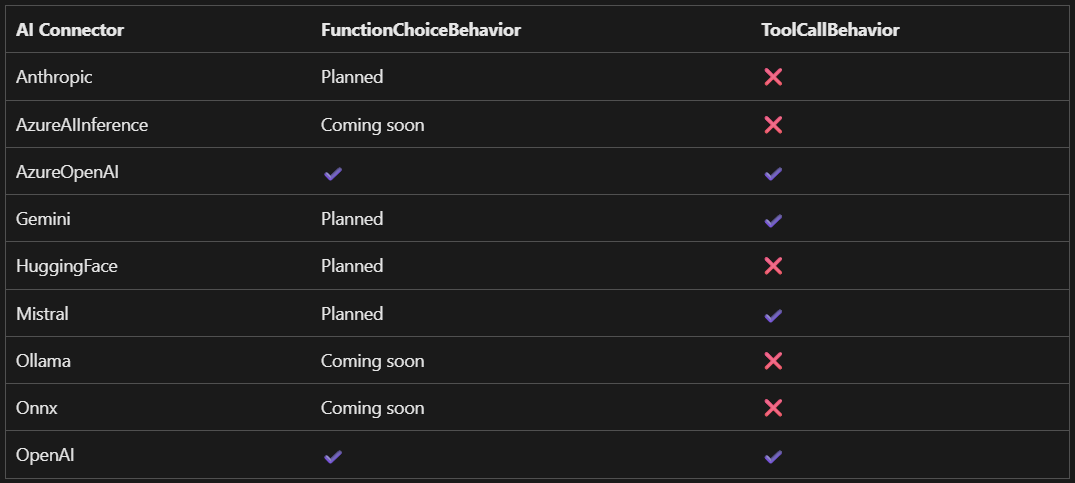
This explains why prompting with ONNX models returns generic answers even when tools are registered. The code structure is correct, but the connector doesn’t support deciding to call the tool.
2. Why Use Gemini 2.5?
Google’s Gemini 2.5 model fully supports tool invocation, allowing for:
- Automatic use of registered tools based on user intent.
- Cleaner implementation with
ToolCallBehavior.AutoInvoke(). - Higher quality, context-aware responses.
It’s ideal to pair with your MCP server and SK for a polished developer experience.
3. Setting Up Gemini in Semantic Kernel
First, install the Google connector:
dotnet add package Microsoft.SemanticKernel.Connectors.Google --prereleaseThen configure the kernel:
using Microsoft.SemanticKernel;kernelBuilder.Plugins.AddFromFunctions(
using Microsoft.SemanticKernel.Connectors.Google;
var kernel = Kernel.CreateBuilder()
.AddGoogleGeminiChatCompletion(
modelId: "gemini-2.5-flash",
apiKey: Environment.GetEnvironmentVariable("GOOGLE_API_KEY")!)
.Build();
"weatherPlugin", tools.Select(aiFunc=> aiFunc.AsKernelFunction()));
Gemini will now support tool calling with:
var executionSettings = new GeminiPromptExecutionSettings
{
    Temperature = 0,
    ToolCallBehavior = GeminiToolCallBehavior.AutoInvokeKernelFunctions,
};
Gemini recognizes when it should use the weather tool, calls it, and integrates the results fluently.
4. Full Console Client Example (Program.cs)
#pragma warning disable SKEXP0070
#pragma warning disable SKEXP0001

using Microsoft.SemanticKernel;
using Microsoft.SemanticKernel.Connectors.Google;
using ModelContextProtocol.Client;

try
{
    var mcpServerProjectPath = Path.GetFullPath(
        Path.Combine(
            AppContext.BaseDirectory,
            "..", "..", "..", "..",
            "WeatherMcpServer", "WeatherMcpServer.csproj"));

    var clientTransport = new StdioClientTransport(
        new StdioClientTransportOptions
        {
            Name = "Get-Weather",
            Command = "dotnet",
            Arguments =
            [
                "run", "--project", mcpServerProjectPath, "--no-build"
            ],
        });

    var mcpClient = await McpClientFactory.CreateAsync(clientTransport);

    var tools = await mcpClient.ListToolsAsync();

    // Print mcp tools
    foreach (var tool in tools)
    {
        Console.WriteLine($" - {tool.Name}: {tool.Description}");
    }

    var kernelBuilder = Kernel.CreateBuilder()
        .AddGoogleAIGeminiChatCompletion(
            "gemini-2.0-flash",
            Environment.GetEnvironmentVariable("GEMINI_API_KEY") ?? String.Empty);

    kernelBuilder.Plugins.AddFromFunctions(
        "weatherPlugin ", tools.Select(aiFunc => aiFunc.AsKernelFunction()));

    var kernel = kernelBuilder.Build();

    var executionSettings = new GeminiPromptExecutionSettings
    {
        Temperature = 0,
        ToolCallBehavior = GeminiToolCallBehavior.AutoInvokeKernelFunctions,
    };

    const string prompt = "What's the weather in Huelva?";
    var result = await kernel.InvokePromptAsync(prompt, new KernelArguments(executionSettings));
    Console.WriteLine(result);

    Console.Write("Press ENTER to finish...");
    Console.ReadKey();
}
catch (Exception ex)
{
    Console.WriteLine($"An error occurred: {ex.Message}");
    Console.WriteLine(ex.StackTrace);
}
Conclusion
- ⚠️ ONNX GenAI (Phi‑3, ONNX) currently 🔒 lacks tool calling.
- ✅ Google Gemini v2.5 Flash supports tool invocation natively.
- 🔄 Your MCP REST API is reused identically — continuous flow and content.
And remember, all the code in the Github repo.
Hope this help. Happy A.I Codding !
References
- Function Choice Behaviors
- Onnx connector and FunctionCalling #8013
- Why Your AI Agent Isn’t Calling Your Tools: Fixing Function Invocation Issues in Semantic Kernel
- Introduction to Semantic Kernel
- Access local SLMs directly #6694
- GitHub issue: Feature request for ONNX Function Calling (#8096)
- Add chat completion services to Semantic Kernel
- Google connector on NuGet and SK docs
 Juanlu, ElGuerre