Introduction
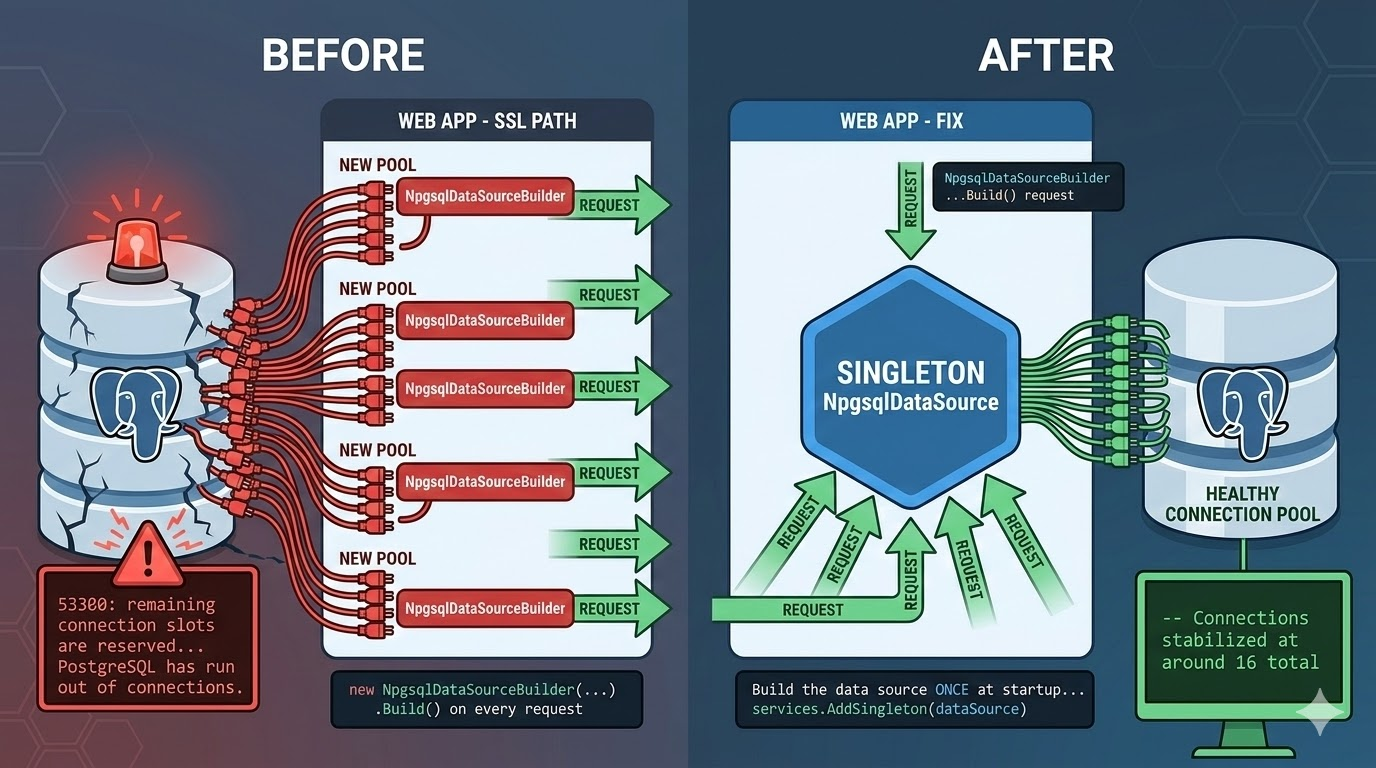
A few days ago, after deploying to our test environment, we missed something. Everything worked fine locally. Tests passed. We moved on. Then the test environment started throwing this error:
53300: remaining connection slots are reserved for roles with the SUPERUSER attribute
PostgreSQL had run out of connections. It took us a while to reproduce it locally, and we only confirmed it by querying PostgreSQL directly with the monitoring queries I share later in this post.
This post explains what caused the leak, why AddDbContextPool was not the answer, and how we fixed it with a singleton NpgsqlDataSource. I also share the SQL queries we used to diagnose and verify the fix.
How PostgreSQL Connections Work
Before diving in, a quick refresher. PostgreSQL limits how many clients can connect at the same time. This limit is set by max_connections (default: 100). A few slots are reserved for superusers (superuser_reserved_connections, default: 3). So regular users get 97 slots.
When your application opens more connections than that, PostgreSQL rejects the new ones with error 53300. In our case, the problem was not high traffic. It was a connection pool leak.
The Bug: A New Connection Pool on Every Request
Here is a simplified version of our DbContext setup. We had two paths — one for deployed environments (which need SSL) and one for local development (plain connection):
services.AddDbContext<AppDbContext>((sp, options) =>{ if (settings.RequiresSsl) { // SSL path: builds a new data source var dataSource = CreateSslDataSource(connectionString, settings.CertificatePath); options.UseNpgsql(dataSource); } else { // LOCAL: plain connection string options.UseNpgsql(connectionString); }});
Can you spot the bug?
The key is that the AddDbContext factory runs on every request. Let’s look at each path:
- Local path:
UseNpgsql(connectionString)is safe. Npgsql keeps an internal global pool keyed by connection string. All requests share the same pool. No leak. - SSL path:
CreateSslDataSource()callsnew NpgsqlDataSourceBuilder(...).Build()every time. EachNpgsqlDataSourcecreates its own connection pool. So every request opens a new pool, grabs a connection, and never reuses the old ones. Connections pile up until PostgreSQL says «no more».
That is why it never happened locally. Without SSL configured, the code always took the safe path.
Why Not Use AddDbContextPool?
The first thing we considered was switching from AddDbContext to AddDbContextPool. After all, it pools DbContext instances and should call the factory less often. But we ran into two blockers.
1. You cannot resolve scoped services
AddDbContextPool does not have the (IServiceProvider, DbContextOptionsBuilder) overload that AddDbContext provides. We use a scoped SaveChangesInterceptor for audit tracking, and we need IServiceProvider to resolve it:
// Works with AddDbContext (has IServiceProvider)services.AddDbContext<AppDbContext>((serviceProvider, options) =>{ options.UseNpgsql(dataSource); var interceptor = serviceProvider.GetRequiredService<AuditInterceptor>(); options.AddInterceptors(interceptor);});// Does NOT work with AddDbContextPool (no IServiceProvider)services.AddDbContextPool<AppDbContext>(options =>{ options.UseNpgsql(dataSource); // No way to get AuditInterceptor here});
2. State leaks between requests
The EF Core docs warn about this:
Avoid using DbContext Pooling if you maintain your own state in your derived DbContext class that should not be shared across requests. EF Core will only reset the state that it is aware of.
When the pool reuses a DbContext, it resets the change tracker and other internal state. But custom state — like the current user set by an audit interceptor — is not reset. Request A’s audit data could leak into request B.
3. It solves a different problem anyway
Here is the important distinction:
AddDbContextPoolpools DbContext objects in memory. It saves ~2us per request.NpgsqlDataSourcepools TCP connections to PostgreSQL. This is where the real cost is.
Our problem was a TCP connection leak, not a DbContext instantiation cost. Even if we could use AddDbContextPool, it would not have fixed the actual issue.
There is a workaround using PooledDbContextFactory with a custom scoped factory, but it adds a lot of complexity for a tiny performance gain. Not worth it.
The Fix: Register NpgsqlDataSource as a Singleton
The solution is simple: build the NpgsqlDataSource once at startup and register it as a singleton.
// Build the data source ONCE at startupvar dataSource = settings.RequiresSsl ? CreateSslDataSource(connectionString, settings.CertificatePath) : new NpgsqlDataSourceBuilder(connectionString).Build();services.AddSingleton(dataSource);// DbContext resolves the singleton -- same pool for every requestservices.AddDbContext<AppDbContext>((serviceProvider, options) =>{ var ds = serviceProvider.GetRequiredService<NpgsqlDataSource>(); options.UseNpgsql(ds); var interceptor = serviceProvider.GetRequiredService<AuditInterceptor>(); options.AddInterceptors(interceptor);});
Now both paths (SSL and non-SSL) share a single NpgsqlDataSource with one connection pool. Connections are reused properly. And we still get our scoped interceptors.
Add Maximum Pool Size for Extra Safety
With the singleton in place, there is one more thing worth doing: set Maximum Pool Size in your connection string.
Host=myserver;Database=mydb;Username=app;Password=secret;Maximum Pool Size=20
This limits how many connections the pool can open. If you have 97 available slots and multiple services sharing the same PostgreSQL server, splitting the budget (e.g., 20 per service) prevents one service from using all the connections.
This does not fix the leak on its own. Without the singleton, each request would still create a new pool of up to 20 connections. But together with the singleton, it gives you a hard upper bound and predictable resource usage.
How to Verify: SQL Queries for Monitoring
After deploying the fix, use these queries to check that connections are healthy:
-- 1. Check your connection limitsSHOW max_connections; -- e.g. 100SHOW superuser_reserved_connections; -- e.g. 3 (so 97 available for regular users)-- 2. Total connections right nowSELECT count(*) FROM pg_stat_activity;-- 3. Connections grouped by stateSELECT state, count(*)FROM pg_stat_activityGROUP BY state;-- 4. Connections by application and state (useful with multiple services)SELECT application_name, state, count(*)FROM pg_stat_activityGROUP BY application_name, stateORDER BY application_name, state;-- 5. Connections to a specific database, by user and applicationSELECT usename, application_name, count(*)FROM pg_stat_activityWHERE datname = 'your_database'GROUP BY usename, application_name;-- 6. Find idle connections sorted by how long they have been idleSELECT pid, application_name, state, backend_start, state_change, now() - state_change AS idle_durationFROM pg_stat_activityWHERE state = 'idle'ORDER BY idle_duration DESC;-- 7. Red flag detector: spot a connection leak-- In a healthy pool, connections are long-lived (old backend_start)-- but actively reused (recent state_change).-- If you see many idle connections with OLD state_change,-- they were opened, used once, and abandoned. That is a leak.SELECT state, count(*) AS total, count(*) FILTER (WHERE now() - state_change > interval '5 minutes') AS idle_over_5min, count(*) FILTER (WHERE now() - state_change > interval '30 minutes') AS idle_over_30min, min(backend_start) AS oldest_connection, max(state_change) AS last_activityFROM pg_stat_activityGROUP BY stateORDER BY total DESC;
Before the fix, the total connection count grew without stopping until it hit max_connections. After the fix, it stabilized at around 16 total connections with about 7 idle — normal pool behavior where connections are created once and reused across requests.
What About the DbContext Pooling Benchmarks?
You might still be wondering about AddDbContextPool. The official benchmarks show a real difference:
| Method | Mean | Allocated |
|---|---|---|
| Without context pooling | 701.6 us | 50.38 KB |
| With context pooling | 350.1 us | 4.63 KB |
That is roughly 2x faster and 10x less memory per operation. If you need it, EF Core provides an official pattern that works with scoped state: register AddPooledDbContextFactory as a singleton, create a custom scoped factory that injects per-request state (like an audit interceptor), and register your DbContext to resolve from that factory. It works, but it requires four DI registrations and a custom factory class instead of one AddDbContext call.
Worth noting: the benchmark is single-threaded, and Microsoft themselves say «a real-world contended scenario may have different results». Also, the ~350us saved per request is small compared to even a simple database query (5-50ms). For most APIs, the singleton NpgsqlDataSource — which solves the actual connection leak — gives you the biggest performance win with zero extra complexity.
Beyond Application Pooling: PgBouncer
If you scale to many services or instances and max_connections becomes a bottleneck again, consider PgBouncer. It is a lightweight proxy that sits between your applications and PostgreSQL. Your services connect to PgBouncer, and it maintains a smaller pool of real connections to the database — allowing hundreds of client connections with far fewer actual PostgreSQL connections.
PgBouncer supports three pooling modes: session (one connection per client session), transaction (one connection per transaction, most common for web APIs), and statement (one connection per query, rarely used). In transaction mode, a real connection is only held for the duration of a transaction and then returned to the pool for other clients.
For a small number of services with controlled pool sizes — like our case with Maximum Pool Size=20 per service — application-level pooling with a singleton NpgsqlDataSource is enough. PgBouncer becomes valuable when you have many services, serverless functions, or horizontal scaling where the total number of connections is hard to predict.
Conclusion
The key takeaway: the AddDbContext options factory runs on every request. If you create a new NpgsqlDataSource inside that factory, you create a new connection pool every time. Register it as a singleton instead.
Watch out for conditional paths that only run in certain environments — they can hide bugs that never show up locally. Set Maximum Pool Size in your connection string for defense in depth. Use the monitoring queries to verify that your pool is healthy. And if you ever outgrow application-level pooling, PgBouncer is there when you need it.
References
- Npgsql EF Core Provider – NpgsqlDataSource Configuration – Official docs on how to configure UseNpgsql with an external data source.
- PostgreSQL Error 53300 with Npgsql – Discussion of the connection slots error.
- Singleton NpgsqlDataSource in EF Core DI – How singleton data sources interact with EF Core dependency injection.
- EF Core DbContext Pooling – Limitations – Official docs on AddDbContextPool constraints.
 Juanlu, ElGuerre