
TL;DR
- Tendero’s landing page opens on a new 30-second film, made only of the repository’s own code, diagrams, numbers and screens.
- The one thing that did not exist, the blog’s shopkeeper moving, was made on a laptop by Wan 2.2, an open image-to-video model.
- The cut was edited in FilmCraft, a free, open-source editor with an MCP server, driven from Claude Code by someone who is not a video editor.
Every now and then, between the articles of the Tendero series, something comes up that is outside the plan, that I enjoy, and that I want to share. Today is one of those days: tinkering a little with FilmCraft and Wan, I made the landing’s film better.
This is the landing’s second film. The first, a 41-second film and its music, made of code, was a web page rendered frame by frame: no video editor, no footage, nothing that was not drawn by the page itself. This one is its evolution — the same rule that nothing on screen is invented, but with a real editor for the cut and, for the first time, a person who moves.
Below: how it was made, what each tool really added, what it cost in time, and when I would not use either of them.
The brief
I gave the coding agent two lines, in Spanish, the way you would brief an agency: a cinematic 30-second ad, 16:9, for the landing page; clean .NET and Angular code, software architecture diagrams, the AI-guided development cycle, and then a smooth transition to the platform running, where people and AI agents work together; slow camera moves, subtle tracking shots, rack focus; high-end, educational, technical.
A first version had followed an earlier brief — «a professional collaborating with AI agents in a bright office» — and it showed the trap of that kind of brief straight away: nothing in it was Tendero. So the rule for the second one was the rule of the project itself: nothing on screen that the repository cannot back.
What is real and what was generated
| Seconds | Shot | Where it comes from |
|---|---|---|
| 0–3 | The shopkeeper sketches the shop and looks up | The blog’s photograph, brought to life by Wan 2.2 |
| 3–9 | A C# vertical slice and an Angular SignalStore, typed in, focus racking from one to the other | The repository’s files, read at render time |
| 9–13 | The C4 model, the camera tilting down through the containers; seven bounded contexts | The landing’s own C4 drawing, held to the AppHost by a script |
| 13–18 | Spec → red → green → 89.10 % of covered mutants killed → NDCG@10 ≥ 0.82 → 61 ADRs | docs/testing.md and the search-quality thresholds |
| 18–26 | A shopper asks and Tino answers; a person approves a return | Recordings of the running shop |
| 26–30 | The shopkeeper with the supplier’s contract; the focus racks to the logo | The second photograph, brought to life the same way |
The rule cost two of the four photographs. One has a chalkboard behind the shopkeeper that says «never below 0.80» — the gate’s real thresholds are 0.82 in Spanish and 0.83 in English. The other, the opening picture of this series, has books and a chalkboard claiming Clean Architecture, MediatR and .NET 9; Tendero is none of those (MediatR is banned outright by its licence policy). Both are good pictures. In a technical film, a false claim in the background is worse than a missing shot.
How it was made
Four steps, each a script, so the film is regenerated rather than re-edited:
- Plates in the browser. Playwright renders every layer on its own,
transparent, at 2400×1350: the code editors as an image sequence (so the
code types itself), the diagrams, the step cards, the captions, the end card.
The colours are the design tokens, read from
design/tokens.css. - The score, as code. The music is composed by a script, 15 bars at 120 bpm, and its cue points — the red test, Tino’s answer, the click that approves — are one table that the edit reads too. A cut and its accent cannot drift apart.
- The shopkeeper, by a local model. Wan 2.2 turned each photograph into five seconds of footage; a small script interpolates it to 30 fps and scales it to the plates’ size.
- The cut, in FilmCraft. Seventeen video tracks and one of audio: the tracking shots are keyframed position and scale, at a different speed per depth so the planes slide past each other; the rack focus is a Gaussian blur keyframed in opposite directions on the near and far planes; Light Leaks and a vignette in the brand’s colours; cross dissolves at every cut. Then the exports: a 61 MB master, a 13 MB copy to share, a 5 MB silent loop for the hero, and the poster.
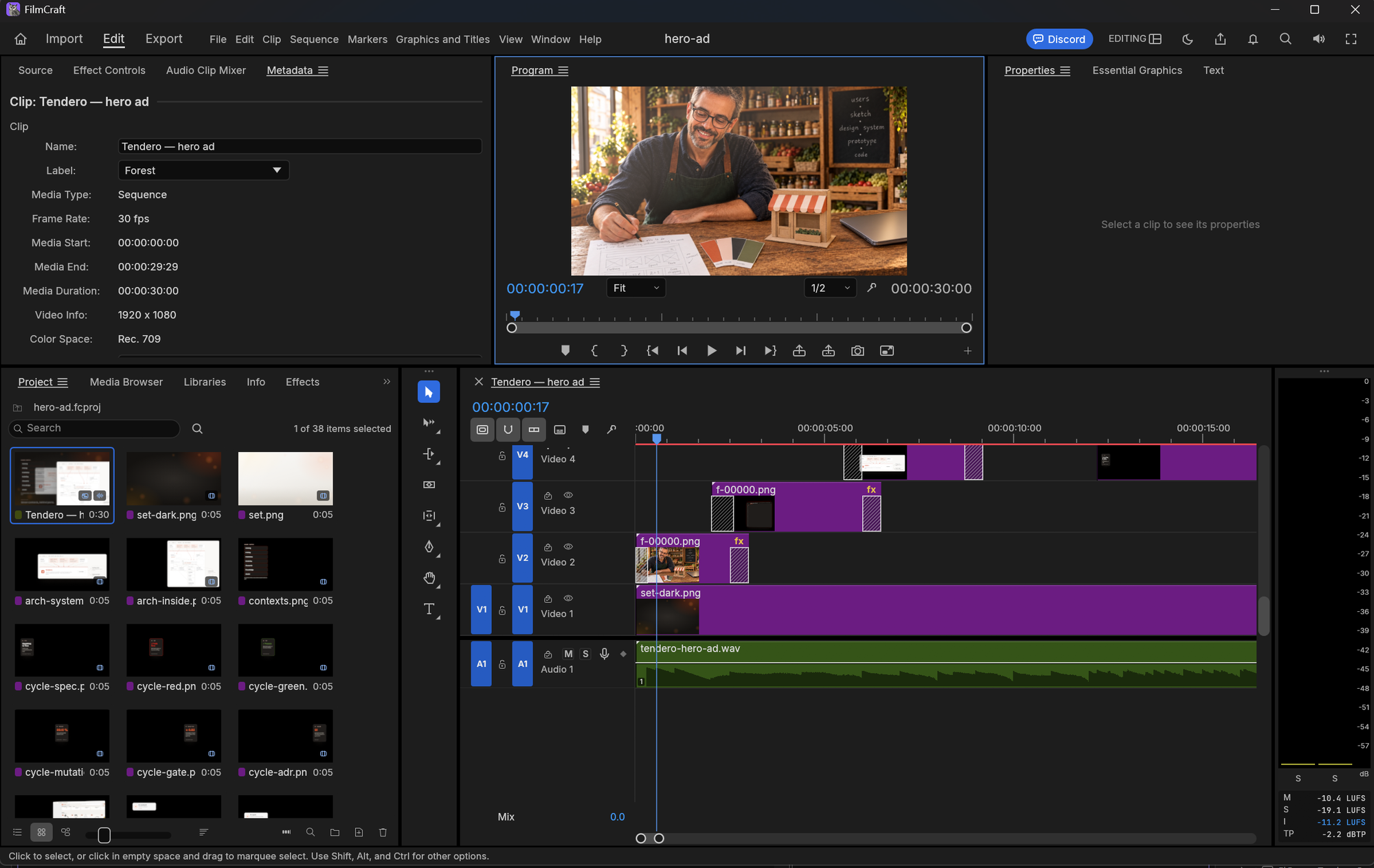
The edit, opened by hand in FilmCraft after the script built it: the shopkeeper’s clip on V2 with its effects, the set on V1, the score on A1 at −11.2 LUFS integrated.
FilmCraft: what it added, and when it is worth it
FilmCraft is an open-source non-linear editor written from scratch in Rust, under the Apache-2.0 licence — free, with no account and no watermark. What made it usable here is that it is built to be driven: it has a command-line interface that runs a script of editing commands (create a sequence, import, place a clip on a track, set a parameter, add a keyframe, export), and an MCP server, so an AI agent can operate it. I registered the MCP server in Claude Code and asked for a film; the agent wrote the edit as a script of those commands and ran it. I am not a video editor. I could still open the result and understand it, because it is an ordinary timeline.
What it really added, measured against what I had before:
- An edit you can open. The previous film
was animated in the page with CSS and rendered frame by frame; any change
went through code.
This one is a
.fcprojproject: a cut, a dissolve or the curve of a move can be changed by hand. - Effects as an editor applies them. Rack focus, parallax and light leaks are keyframed on composited layers. CSS can fake most of them; it is more work and less forgiving.
- The exports. Presets for a master, a shareable copy and a web loop.
What it did not add: any shot. FilmCraft edits; it does not generate.
When I would use it: a film with several layers, camera moves and focus pulls, and a cut that a person may want to adjust after the agent is done.
When I would not: a single screen recording, a slideshow with a crossfade,
or a cut that is generated from code and that nobody will touch by hand. A
browser and ffmpeg are simpler and faster there: FilmCraft took 19 minutes to
export the three versions on a laptop, ffmpeg takes a few. Also note that it
is young — the releases are still 0.x — so keep the project regenerable from a
script rather than treating the .fcproj as the only copy.
Wan 2.2: what a local video model is good for
The one thing no tool in the pipeline could do before was moving footage of a person. A browser paints what exists; an editor edits it. With the photographs alone, the shopkeeper could only be a still with a slow zoom.
Why Wan 2.2 TI2V-5B. I chose it by elimination, in this order:
- Licence. For this project, model weights are a dependency like a NuGet package and must be permissive. Wan 2.2 is Apache-2.0. HunyuanVideo’s licence excludes the EU, where I live; LTX-Video has its own licence, to be read version by version.
- The hardware I have. An RTX 5070 laptop GPU with 8 GB of VRAM and 64 GB of RAM. The 5-billion-parameter model does not fit in 8 GB, but ComfyUI (which runs it) keeps part of the weights in RAM and streams them. The 14-billion version would not be practical here.
- One model for text-to-video and image-to-video («TI2V»). Image-to-video was the point: starting from the photograph is what keeps the shopkeeper’s face.
What it cost. About 18 GB of downloads (the model, its text encoder and its VAE), and time: each 5-second clip at 1280×704, 30 diffusion steps, took 29 to 60 minutes. 29 minutes with the machine to itself; nearly twice that when a mutation-testing run was sharing it — a laptop does one heavy thing at a time.
What it gave. Two very different results:
- Text-to-video — an office, a desk, hands on a keyboard — came out soft, close to out of focus. Usable as a background, not as a shot.
- Image-to-video — the shopkeeper — came out sharp, with the face of the photograph, and the motion I asked for: looking up and smiling, writing on the contract. Those are the two shots in the film.
The lesson is the second one: a small local model is weak at inventing a scene and good at animating one you already have.
Wan or Veo 3.1?
Google’s Veo is the obvious alternative: a hosted model, far stronger, with sound generated together with the picture. The Gemini API prices it per second of video generated, sound included, with no free tier:
| Wan 2.2 TI2V-5B, local | Veo 3.1 (Gemini API) | |
|---|---|---|
| Price | Free; the laptop’s electricity | $0.40/s Standard, $0.10–0.12/s Fast, $0.05–0.08/s Lite (720p–1080p) |
| Our 10 s of shopkeeper | ~1.5 hours of the laptop | $4 Standard or $1.20 Fast, per attempt |
| Time per clip | 29–60 minutes | Minutes |
| Realism | Good animating a photograph; soft inventing a scene | Much higher, including people talking |
| Sound | None | Generated with the video |
| Your images | Never leave the machine | Uploaded to the service |
| Licence | Apache-2.0 weights you keep | The service’s terms; the model is not yours |
| Reproducible | Same weights, seed and prompt, any time | Depends on the service and its versions |
A note on waiting. The hour per clip did not cost me anything this time. It was a Sunday: while the laptop rendered, I did some sport, had a long breakfast with my family and went for a walk. Waiting is not always a cost — when you know exactly what you want, and you are fairly sure the result will be good, the machine can work while you live. It is a cost when you are still searching: then every attempt is an hour, and that is when a hosted model earns its price.
At those prices, ten seconds of footage cost a few dollars — but a film is never one attempt, and every attempt costs again. Locally, an attempt costs time.
When Veo is the better choice: you need realism in close-up, people speaking, sound, or many clips quickly, and the budget and the terms suit you. When a local model is: your own character or product from your own pictures, subtle motion, images that should not leave your machine, a licence you control, and the patience to wait for each clip. For Tendero — an open-source project with a fixed cast of one shopkeeper — the second list won. It would not for a commercial with actors.
What I would do again, and what I would not
- Again: start from the rule nothing on screen the repository cannot back. It removed two good pictures and made the film credible.
- Again: image-to-video from existing photographs, not text-to-video.
- Again: the cut as a script that an agent writes and a person can open.
- Not again: run the video model and anything heavy at the same time. The same clip took 29 minutes alone and nearly an hour shared.
- Not: a heavier local model to chase realism. The film shows the shopkeeper for six seconds out of thirty; better shots there are not where the next hour is best spent.
The film is on Tendero’s landing page, where the hero loops it silently; press Watch the film to hear it — browsers only allow sound after a click. The page’s code, the film’s scripts included, stays private for now, and joins the public repository when the workshop and the public history become one.
Next article: Your build is green and your shop’s search is broken — the quality gate whose threshold the film had to get right.
Tendero — commerce for humans and agents.


The rule that nothing on screen is invented, except the shopkeeper moving, is a clever constraint. Using an open image-to-video model like Wan 2.2 on a laptop for that one shot, and an MCP-driven editor for the cut, shows where local models already fit into a real workflow.
Me gustaMe gusta