
TL;DR
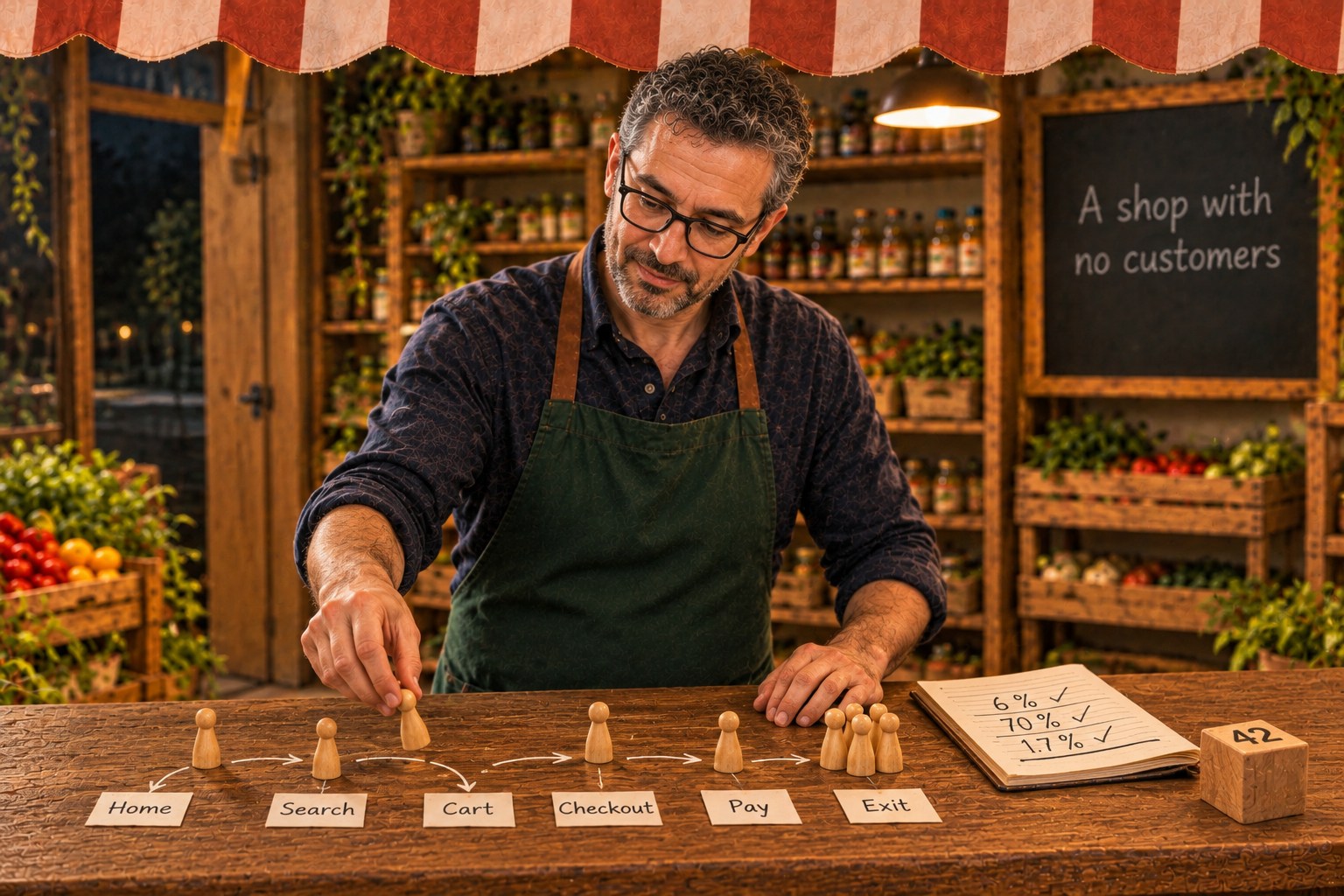
Continuing our series on Tendero, the AI-native ecommerce platform, in this article I show a way to give any shop customers before it has real ones, in seven steps, with Tendero as the worked example.
- A shop in staging, a new shop or a new checkout has no customers. Its dashboards, funnels and alerts cannot be checked until real people arrive, and then it is too late.
- The fix works for any shop: describe your visitors as Markov chains, check them against your real funnel numbers, and run them in real browsers.
- Be careful: a simulator is a test with no assertion. Ours failed silently twice.
The problem: no customers, no data
The Shop pulse dashboard from the previous article had one problem the first time I opened it: nothing on it moved. Tendero runs on a laptop. It has a hundred products (120 today), two warehouses, and no customers.
A dashboard over no traffic is a flat line. A funnel over no traffic is empty. An alert over no traffic never fires, so you never learn if it works.
Every shop has moments like this, not only a laboratory one:
- a staging environment, where the next release waits;
- a new shop, or a shop moving to a new platform, before launch day;
- a new checkout, a new dashboard or a new analytics tool, before anybody uses it.
In all of them, the first real customers are also the first test of your data. That is the worst moment to find a bug. In the previous article, the first dashboard lied twice — once about conversion, once about what it sent — and I only saw it because there was traffic to look at. That traffic was simulated.
So this article is about giving a shop simulated customers, and being honest about it.
Three things are easy to confuse here:
- Synthetic monitoring runs a few scripted checks, again and again: is it up?
- Load testing sends a lot of traffic: where does it break?
- Traffic simulation runs a population of visitors that behave like people, at a realistic pace: what would the data look like if people used it?
Large companies get the third one by replaying real traffic. With no real traffic, the only option is a model. In Tendero the tool is tools/TrafficSim: one .NET process, one scheduler, one seed.
A few words first, because the rest of the article uses them:
- A persona is one kind of visitor, described by what that kind of visitor usually does: the one who only looks, the one who searches for something, the one who comes back to return an order.
- A headless browser is a real browser, here Chromium, that runs without a window. It loads the same pages and runs the same code as yours; nobody sees it.
- MCP (Model Context Protocol) and UCP (Universal Commerce Protocol) are the two ways an AI agent talks to Tendero without a browser. MCP is the common protocol for giving an assistant tools; UCP is a protocol for shopping, with a catalogue and a checkout.
- A seed is the number a random generator starts from. The same seed gives the same «random» numbers, every time.
- A trace is the story of one request, step by step, as in the previous article.
The recipe
These are the seven steps. Each section below explains one, shows how Tendero does it, and says how to do it in your shop.
- Choose a few kinds of visitor.
- Write each one as a Markov chain.
- Check the totals, not each number.
- Make every run repeatable.
- Use real browsers for people, and the API for agents.
- Label everything the simulator sends.
- Tie the simulator to something that fails.
Step 1. Choose a few kinds of visitor
Do not try to simulate «a visitor». Real visitors are different from each other, and the differences are what your dashboards are for.
Tendero has six personas:
- a window shopper, who browses and rarely buys;
- a searcher, who arrives with something in mind;
- a customer who comes back to return something from an order;
- the shopkeeper, who signs into the backoffice and ships and delivers orders;
- two AI agents, one over MCP and one over UCP’s REST binding.
The returner and the shopkeeper were not in the first version, and the simulation needed them as much as the customers. Without somebody shipping, no reservation is ever committed, and no order can ever come back. The returner is the only place where sessions depend on each other: a return needs an order that another session delivered. In one run, the returner picked an order that had been shipped but not delivered, found no return form, and skipped the step. That is how a real shop’s returns lag behind its deliveries.
In your shop: if you have analytics, start from the segments you already report on. If you have none, start with two: one person who browses and one who searches. Add the people who work in the shop if your data depends on them.
Step 2. Write each one as a Markov chain
Where the name comes from. Andrey Markov was a Russian mathematician. In 1906 he published the idea that now carries his name: a sequence of random steps where the chance of the next step depends only on where you are now, not on how you got there. In 1913 he tried it on real text, the first 20,000 letters of Pushkin’s Eugene Onegin, and counted how often a vowel follows a consonant. A Markov chain is that idea written down: a list of states, and for each state the chance of going to each next one.
Why ecommerce uses it. A visit to a shop looks like that: a person is on one page, and from there goes to another page or leaves. Around 1999 and 2000, Daniel Menascé and his colleagues turned this into a way to describe a shop’s visitors, the Customer Behavior Model Graph (CBMG). The states are the kinds of page (home, search, product, cart…). The arrows are the chances of moving between them. Every walk ends when the visitor leaves, at Exit. Each kind of visitor has a graph of its own. The TPC-W benchmark, a standard test of how fast an online shop is, used the same kind of model to drive its simulated shoppers.
Why it works for a simulator. There is no real traffic to replay, and a fixed script walks the same path every time. A Markov chain sits between the two, and it has four useful properties:
- One arrow, one number. Each arrow is a probability you can read, question and write a source for.
- It is cheap to walk. A test can walk a chain hundreds of thousands of times in seconds and count what comes out. Step 3 depends on this.
- It is repeatable. With the same seed, the same walk comes out.
- It matches what a browser does. A state is a kind of page, and a browser can reach each kind of page.
The price is memory: a chain does not remember that the person already saw this product twice. For testing your data before launch, that is an acceptable price.
This is Tendero’s searcher:
[Step.Home] = T((Step.Search, 0.80), (Step.Browse, 0.10), (Step.Exit, 0.10)),[Step.Search] = T((Step.Product, 0.60), (Step.Search, 0.20), (Step.Exit, 0.20)),[Step.Browse] = T((Step.Product, 0.50), (Step.Search, 0.20), (Step.Exit, 0.30)),[Step.Product] = T((Step.AddToCart, 0.10), (Step.Product, 0.10), (Step.Search, 0.30), (Step.Exit, 0.50)),[Step.AddToCart] = T((Step.Cart, 0.60), (Step.Search, 0.15), (Step.Exit, 0.25)),[Step.Cart] = T((Step.Checkout, 0.68), (Step.Search, 0.07), (Step.Exit, 0.25)),[Step.Checkout] = T((Step.Pay, 0.72), (Step.Exit, 0.28)),
→ Reference: tools/TrafficSim/Model/ShopModel.cs, lines 106–121, the searcher with its share of the visits and where that share comes from
Read the first line as: from the home page, 80 % of searchers search, 10 % browse a category and 10 % leave.
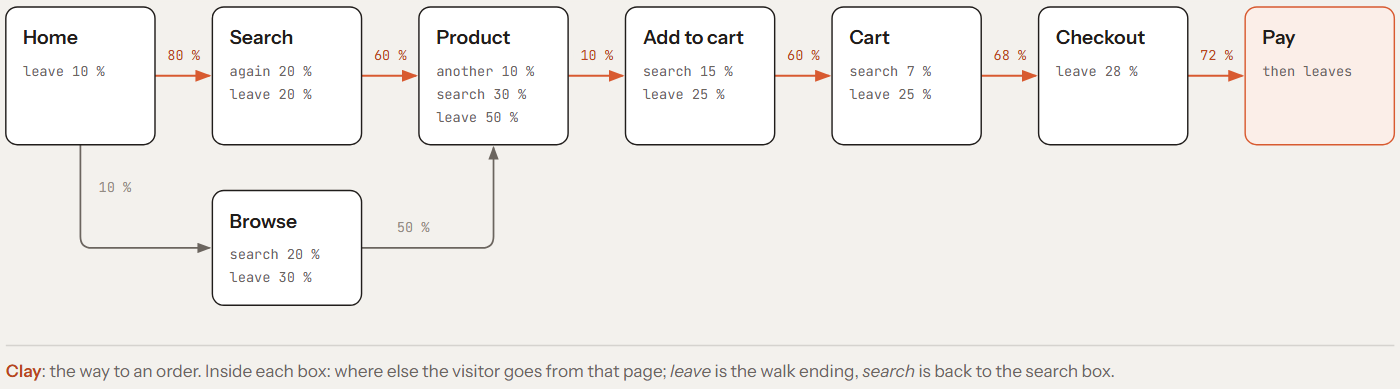
The same chain as a picture. Follow the clay arrows and multiply: 0.80 × 0.60 × 0.10 × 0.60 × 0.68 × 0.72 is about 1.4 % of searchers reaching Pay in a straight line. The ways back to the search box give some of the others another chance. Most of what happens is in the small print inside each box: where people leave or go back to search. That is why one arrow can move the totals so much.
In your shop: list your kinds of page, not your URLs: home, category, search, product, cart, checkout, payment. Then write, for each persona, the chance of going from each kind of page to the next. Your first numbers will be guesses. That is fine, because of step 3.
Step 3. Check the totals, not each number
Nobody can prove that 0.72 is the right chance of paying once you reach the checkout. But some numbers about a shop’s visitors in total are known, and those can be checked.
In Tendero, every number says where it comes from, and how much to trust it:
- Cart abandonment is Baymard’s 70.22 %, the average of 50 studies: primary.
- The time between pages is TPC-W’s, 7 seconds on average: primary.
- The conversion range, 1.6 % to 2.9 % of visits, comes through a summary of other sources: secondary.
- The share of visitors who search comes from vendors’ figures: low.
- The probabilities in the chains are mine, marked as an assumption.
So the dashboard shows the simulator’s assumptions, not a market. I would rather say it here than have somebody find it.
Three of those numbers describe what visitors do in total: about 6 % add something to the cart, about 70 % of carts are abandoned, and between 1.6 % and 2.9 % of visits end in an order. A test walks each shopping persona 200 000 times with a fixed seed and checks that the chains give those three numbers.
→ Reference: tests/TrafficSim.Tests/ShopModelTests.cs, lines 68–95, the test, with its three ranges at the end
The probabilities I first wrote down, by hand, to look plausible, gave 77.33 % abandonment: too high. I raised the arrows into checkout and payment, and abandonment came down to 72.90 %. Then the test failed on something else: conversion was 1.32 %, below the range, and add-to-cart only 5.08 %.
That second failure was the useful one. The published numbers agree with each other: 6 % of visits adding to cart, times the 30 % of carts that are not abandoned, is about 1.8 % conversion. When one number is right and another is wrong, one specific arrow is wrong. After raising the chance of adding a product to the cart: 6.36 %, 71.54 % and 1.73 %, all three inside.
Now, if somebody changes a probability and breaks a published rate, a test turns red. The dashboard does not quietly change.
In your shop: this step is better for you than it was for me, because you can use your own numbers. Take your add-to-cart rate, your cart abandonment and your conversion from your analytics, and make the test check that your chains give the same three. If your shop is new, use published figures and say so.
Step 4. Make every run repeatable
Visits do not arrive evenly. Tendero’s simulator follows a 24-hour curve — quiet before dawn, a bump at lunch, the peak in the evening — compressed into an hour of real time. Arrivals are random, but their average follows the curve. In statistics this is a non-homogeneous Poisson process. The simulator draws it the classic way: it proposes arrivals at the peak rate, and keeps each one with a probability equal to that hour’s rate divided by the peak rate.
→ Reference: tools/TrafficSim/Scheduling/Arrivals.cs, lines 18–37
Everything comes from one number. Each session’s seed depends only on the run’s seed and the session’s position:
public static int ForSession(int runSeed, long index) => (int)(Mix(unchecked((ulong)(uint)runSeed * 0x9E3779B97F4A7C15UL + (ulong)index)) >> 33);
→ Reference: tools/TrafficSim/Scheduling/Seeds.cs, lines 14–15; Mix is SplitMix64’s mixing step, a small, well-known way to turn one number into another that looks unrelated
The whole journey is drawn from that seed before the first request: every step, every search, whether the card works, whether the person accepts analytics. Whatever the shop answers, and however slowly, the next step does not change. The previous article compared two browser SDKs by running the same 40 sessions twice, once per SDK. This is why it could.
The searches come from the search quality test’s golden set — the list of queries with a person’s judgement of which products should answer each one, from article 03 — including the queries that nothing matches (GoldenQueries.cs). So the dashboard’s «searches with no results» and the search quality test talk about the same questions.
In your shop: keep the seed in your configuration, and write it down with every run. Use your own search terms, taken from your search logs, and keep the ones that find nothing: they are the ones your dashboard should show.
Step 5. Use real browsers for people, and the API for agents
People run in real headless Chromium, through Microsoft.Playwright, and click what a person would click: the search box, a product card, Add to cart, the checkout form, a card from the fake payment provider. So the page’s own telemetry is real: its Web Vitals (the browser’s own measures of how fast a page feels, from the previous article), its errors, and its trace from a click to the API. A script that only calls the API would miss all of that.
Agents run in the same process, with no browser. The MCP agent uses the same MCP client an assistant would, and calls search_products and then get_product_detail. The UCP agent posts to /ucp/catalog/search and then looks up one of the results. Neither buys anything: at this tag, agents could not buy yet. They can now, over UCP; the simulator’s agents still only read.
A step that cannot be done — a product that is sold out, a cart that is empty — is skipped and tagged, never retried. The shop said no, and that is traffic too.
The first run with a seed that should have bought something ended with three carts and no order. The traces said which step had been skipped: Pay, twice. The driver checked whether the card buttons were visible with Playwright’s IsVisibleAsync(). That method looks once and does not wait, and the checkout page had not finished drawing its cards yet. The end-to-end tests in the same repository already had a comment about exactly this — «isVisible() is the one assertion here that does not auto-retry» — and I made the same mistake anyway. After waiting for each element, with a time limit: one order placed and one card declined, exactly the two journeys that seed had drawn.
→ Reference: tools/TrafficSim/Driving/BrowserDriver.cs, lines 258–270, the wait, and the end-to-end tests’ warning: shopper.spec.ts, lines 194–198
In your shop: use a browser automation tool you already know, and always wait for an element before you decide it is not there. If AI agents can buy from your shop, simulate them too, through the same protocol they use.
Step 6. Label everything the simulator sends
Simulated traffic must never be mistaken for real traffic.
Every request from Tendero’s simulator carries three labels: an X-Tendero-Synthetic header with the run’s id, W3C baggage with the persona (baggage is a standard header that carries small key-value pairs along a request, from service to service), and a suffix on its User-Agent. The API turns them into attributes on its own spans, including OpenTelemetry’s standard user_agent.synthetic.type=test. The storefront’s telemetry reads the suffix and labels everything the page sends. In Tempo, Grafana’s store for traces, simulated people, simulated agents and the simulator’s own sessions are each one query away.
→ Reference: src/Api/SyntheticTraffic.cs, lines 19–31, the API’s side, and synthetic.ts, lines 6–10, the browser’s
The agents are labelled too. Their calls are real calls to the same tools a real agent uses, and one day the label will be the only thing that tells a simulated agent from a real one.
In your shop: add a header and a User-Agent suffix, read them where your telemetry starts, and keep labelled traffic out of the numbers your business reads. If you ever run the simulator against production, this step is not optional.
Step 7. Tie the simulator to something that fails
Six weeks after the simulator was built, while I was writing the previous article, it ran 85 sessions in 30 minutes. One of them was drawn to pay. The dashboard said No data. The shop had sold nothing, and nothing had failed.
The storefront had changed under the simulator. The checkout form now named its fields address.recipientName instead of recipientName, and the pay button had lost the CSS class the simulator looked for. A step that cannot find its element is skipped — on purpose, because a sold-out product is a real skip. And the session’s log line listed the steps it had drawn, not the ones it had done. So the log said «Checkout > Pay» for a checkout that never happened.
The fix, made after this article’s tag, copied the end-to-end tests’ way of finding things: the address fields by their names, the pay button by what it says. Those tests run on every pull request, so their way stays true. The simulator’s copy does not, and it can drift again.
This is the most important lesson of the article: a simulator is a test with no assertion, so when it drifts, nothing turns red.
In your shop: tie the simulator to something that fails. Share one set of locators between the simulator and your end-to-end tests, or run a short simulation in CI that must place at least one order. And log what each session did, not only what it planned.
What it costs
On my laptop, Chromium’s headless shell uses about 155 MB with no session open, and 150–210 MB more for each session open at the same time. The simulator is sized to look plausible, not to load the shop: three or four new sessions a minute at the simulated peak. In Tendero it is an Aspire resource that never starts by itself (AppHost.cs, lines 620–626): you press Start in the dashboard.
It also paid for itself in a way I did not expect. The simulator needed journeys the end-to-end tests did not have — paying, a declined card, a checkout left half way, a return across both applications — so they became tests too. The one for the abandoned checkout failed its first screenshot for a reason nobody had asked about: the consent banner, fixed to the bottom of the window, was covering the cart’s totals.
When you will want it
You do not need a simulator every day. You will want one on these days:
- Before a sales peak, to see your dashboards and alerts with traffic shaped like a real day.
- Before launching a new shop, or moving to a new platform, so the first real customers are not also the first test of your data.
- When you build a dashboard or an alert, to see it move before you trust it.
- When you compare two tools or two versions, because the same seed gives both the same visitors.
- When you change the checkout, to watch the funnel with journeys that pay, fail and give up.
- When you open your shop to AI agents, to see them in your data next to people.
The repository is public and MIT licensed, and the code exactly as this article describes it is tagged blog/06-a-shop-with-no-customers. The simulator and its model are in tools/TrafficSim, with a README that lists every setting.
How we know it works
- The test that fails: the model’s tests were broken on purpose — a session seed that ignores its position, a flat arrival rate, the personas’ shares ignored, a return reason renamed — and each one turned red. One change survived: raising a single persona’s chance of paying moves the overall abandonment by less than the tolerance. The sources publish totals, so the test can only check totals.
- The check on every pull request: the model’s tests, and the end-to-end journeys for paying, declining, abandoning and returning.
- The mutation score: not at this tag. Stryker ran just after it, and the simulator’s first baseline came out at 87.66 % of covered. The run found that the published rates’ tolerances hid several small mistakes in how a journey is drawn, so each one now has a test of its own; with those, the model’s test walks 50 000 times instead of 200 000. How to read that score is article 04.
Next article: The catalogue nobody could find — the simulated shoppers can only buy what is on sale, and there was a week when, by construction, nothing was.
Tendero — commerce for humans and agents.

