
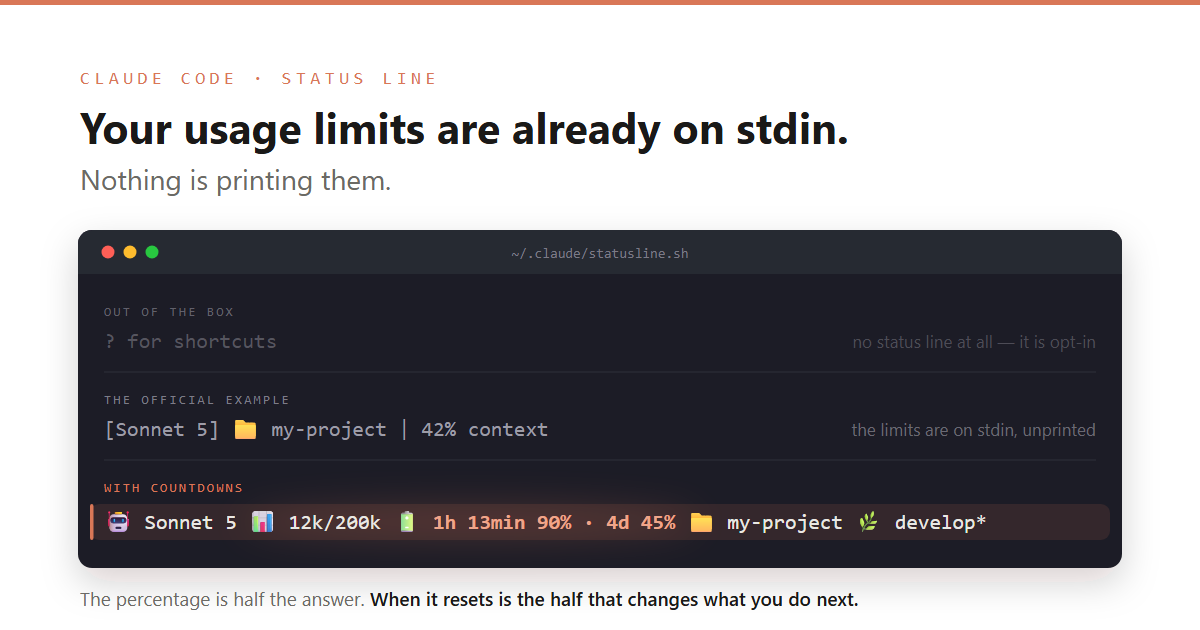
TL;DR: A statusline.sh script turns the Claude Code status bar into a live readout of your model, context usage and — the good part — exactly how long until your 5-hour and weekly limits reset.
Introduction
I have been using Claude Code for a while now, and until a few days ago — right before the holidays — I had not realised how useful the /statusline command actually is. It had been sitting there the whole time and I kept ignoring it.
As we all know, token consumption is something we end up checking more or less constantly, depending on how we drive our agents. The status line takes most of that back-and-forth away, and this small tip — which I am sure more than one of you already knows — is worth sharing anyway.
The problem: stopping to ask «how much do I have left?»
If you are on a Pro or Max plan you have two rolling windows: a 5-hour session window and a 7-day weekly one. Running /usage to check them is not hard, but it breaks your flow, and it is exactly the kind of thing you want to glance at rather than ask for.
Worse, the default framing is not very actionable. Knowing you have «60% left on the 5h window» is only half the answer. The half that actually changes what you do next is when it resets.
The solution: a status line that counts down
Out of the box there is no status line at all — it is opt-in, which is most of the reason I ignored it for so long. Once you configure one, Claude Code adds a row of its own above the built-in footer badges and fills it with the first line of stdout from any command you name. It hands your script a JSON payload on stdin containing the model, the working directory, the context window and — for Pro/Max sessions — a rate_limits object:
{ "rate_limits": { "five_hour": { "used_percentage": 23.5, "resets_at": 1738425600 }, "seven_day": { "used_percentage": 41.2, "resets_at": 1738857600 } }}
Here is the part worth noticing. The official quickstart script prints this:
[Sonnet 5] 📁 my-project | 42% context
Feed it the exact payload above — rate_limits included — and that is still all you get. The limits are handed to your script on every render and simply never make it to the screen, because nothing prints them. Configuring a status line does not give you the limits; it gives you a place to put them.
And resets_at being Unix epoch seconds is all we need to turn a static label into a countdown. So instead of 5h 90% · 7d 45%, where 5h and 7d are just the windows’ names and never change, we can print 1h 13min 90% · 4d 45%.
Here is the whole script. It is the one I actually run, not a trimmed version for the post. Save it as ~/.claude/statusline.sh:
#!/usr/bin/env bash## Claude Code status line.## 🤖 Sonnet 5 (1M) 📊 12k/200k 🔋 1h 13min 90% · 4d 45% 📁 my-project 🌿 develop*## Install:# 1. Save this file as ~/.claude/statusline.sh# 2. Add to ~/.claude/settings.json:# { "statusLine": { "type": "command", "command": "bash ~/.claude/statusline.sh" } }## Contract: Claude Code writes a JSON payload to stdin and renders the first line of# stdout. Every field in that payload is optional — `rate_limits` only exists for# Claude.ai Pro/Max sessions, and not before the first API response — so each segment# renders only when its data is there, and the line degrades instead of printing# placeholders.## Segment order is deliberate: model · context · limits · folder · branch. The limits# used to sit last and fell off the right edge whenever the branch name was long — the# data was in the payload, it just never made it on screen. The branch is the only# expendable segment, so it goes last and is the one that gets elided.## Dependencies: bash, awk and git. jq is used when present, never required.set -u# ---------------------------------------------------------------------------# Appearance# ---------------------------------------------------------------------------readonly ICON_MODEL="🤖"readonly ICON_CONTEXT="📊"readonly ICON_LIMITS="🔋"readonly ICON_FOLDER="📁"readonly ICON_BRANCH="🌿"readonly SEGMENT_GAP=" "readonly LIMIT_SEPARATOR=" · "readonly ELLIPSIS="…"readonly DIRTY_MARKER="*"# Below this many columns the branch is dropped rather than shown as a bare ellipsis.readonly MIN_BRANCH_COLUMNS=4# Glyphs above that cost more bytes than the columns they occupy, as "glyph:columns".# Only consulted when bash is counting bytes rather than characters — see display_width.readonly MULTIBYTE_GLYPHS=( "${ICON_MODEL}:2" "${ICON_CONTEXT}:2" "${ICON_LIMITS}:2" "${ICON_FOLDER}:2" "${ICON_BRANCH}:2" "·:1" "${ELLIPSIS}:1")# ---------------------------------------------------------------------------# Environment probes# ---------------------------------------------------------------------------# A UTF-8 ctype makes ${#s} count characters instead of bytes, which is what the width# arithmetic needs. Probed rather than assumed: the emoji is four bytes, one character.export LC_ALL="${LC_ALL:-C.UTF-8}"__probe="🤖"if [ "${#__probe}" -le 2 ]; then readonly WIDTH_IS_NATIVE=1; else readonly WIDTH_IS_NATIVE=0; fiunset __probeif command -v jq >/dev/null 2>&1; then readonly HAVE_JQ=1; else readonly HAVE_JQ=0; fi# ---------------------------------------------------------------------------# Reading the payload# ---------------------------------------------------------------------------field_in() { # field_in <json_text> <key> -> the key's scalar value, unquoted, or nothing. # A deliberately shallow regex: enough for this flat payload, no more. printf '%s' "$1" \ | grep -o "\"$2\"[[:space:]]*:[[:space:]]*\(\"[^\"]*\"\|[0-9.]\+\)" \ | head -n1 \ | sed -E 's/^[^:]*:[[:space:]]*//; s/^"//; s/"$//'}json_get() { # json_get <jq_filter> <key> -> the value from the payload, or nothing. # jq resolves the exact path when available; the regex is the fallback for the many # machines without it, and reads the key wherever it appears. local value="" if ((HAVE_JQ)); then value="$(printf '%s' "$PAYLOAD" | jq -r "$1 // empty" 2>/dev/null)" fi [ -z "$value" ] && value="$(field_in "$PAYLOAD" "$2")" printf '%s' "$value"}read_window() { # read_window <five_hour|seven_day> -> "<remaining_percent> <resets_at_epoch>". # Non-zero exit when the window is absent, which is the normal case on other plans. local window="$1" used="" resets="" block if ((HAVE_JQ)); then used="$(printf '%s' "$PAYLOAD" | jq -r ".rate_limits.${window}.used_percentage // empty" 2>/dev/null)" resets="$(printf '%s' "$PAYLOAD" | jq -r ".rate_limits.${window}.resets_at // empty" 2>/dev/null)" fi if [ -z "$used" ]; then # Scoped to the window's own object, so the two windows cannot be confused. block="$(printf '%s' "$PAYLOAD" | tr '\n' ' ' | grep -o "\"${window}\"[[:space:]]*:[[:space:]]*{[^}]*}")" [ -z "$block" ] && return 1 used="$(field_in "$block" used_percentage)" resets="$(field_in "$block" resets_at)" fi [ -z "$used" ] && return 1 awk -v used="$used" -v resets="$resets" \ 'BEGIN { left = 100 - used; if (left < 0) left = 0; printf "%.0f %s", left, resets }'}# ---------------------------------------------------------------------------# Formatting# ---------------------------------------------------------------------------format_tokens() { # format_tokens <count> -> "900" / "12k" / "?" when the count is missing or not a number. local count="${1:-}" if [ -z "$count" ] || ! [ "$count" -eq "$count" ] 2>/dev/null; then printf '?' elif [ "$count" -ge 1000 ]; then awk -v n="$count" 'BEGIN { printf "%.0fk", n / 1000 }' else printf '%s' "$count" fi}seconds_until() { # seconds_until <epoch> -> seconds remaining. Non-zero exit when past or unknown. local target="${1:-}" now now="$(date +%s 2>/dev/null)" { [ -n "$target" ] && [ -n "$now" ]; } || return 1 [ "$target" -gt "$now" ] 2>/dev/null || return 1 printf '%s' $((target - now))}format_countdown() { # format_countdown <epoch> -> "42min" / "1h 14min" / "3d 5h". Empty when unknown. local secs hours minutes secs="$(seconds_until "${1:-}")" || return 1 hours=$((secs / 3600)) minutes=$(((secs % 3600) / 60)) if ((hours >= 24)); then printf '%dd %dh' $((hours / 24)) $((hours % 24)) elif ((hours > 0)); then printf '%dh %dmin' "$hours" "$minutes" else printf '%dmin' "$minutes" fi}format_days_left() { # format_days_left <epoch> -> "4d", rounded up. Empty when unknown. # A partial day still counts: "1d" reads truer than "0d" for a window resetting tonight. local secs secs="$(seconds_until "${1:-}")" || return 1 printf '%dd' $(((secs + 86399) / 86400))}# ---------------------------------------------------------------------------# Segments# ---------------------------------------------------------------------------segment_model() { # "Opus 5 (1M context)" -> "Opus 5 (1M)": the window size is worth saying, the word is not. local name name="$(json_get '.model.display_name' display_name | sed -E 's/ context\)/)/')" printf '%s %s' "$ICON_MODEL" "${name:-unknown}"}segment_context() { printf '%s %s/%s' "$ICON_CONTEXT" \ "$(format_tokens "$(json_get '.context_window.total_input_tokens' total_input_tokens)")" \ "$(format_tokens "$(json_get '.context_window.context_window_size' context_window_size)")"}segment_limits() { # Each window prints as "<time left> <percent left>", e.g. "1h 13min 90% · 4d 45%". # The countdown is the actionable half; the window's nominal length is the fallback # label, used only when resets_at is missing, so a wrong number is never shown. local parts="" window label fallback data for window in "five_hour:5h:format_countdown" "seven_day:7d:format_days_left"; do data="$(read_window "${window%%:*}")" || continue fallback="${window#*:}"; fallback="${fallback%%:*}" label="$("${window##*:}" "${data#* }")" || label="" parts+="${parts:+$LIMIT_SEPARATOR}${label:-$fallback} ${data%% *}%" done [ -z "$parts" ] && return 1 printf '%s %s' "$ICON_LIMITS" "$parts"}segment_folder() { printf '%s %s' "$ICON_FOLDER" "$(basename "$CWD" 2>/dev/null || printf '%s' "$CWD")"}current_branch() { # current_branch -> "develop" or "develop*" when the working tree is dirty. local branch [ -d "$CWD" ] || return 1 branch="$(git -C "$CWD" --no-optional-locks rev-parse --abbrev-ref HEAD 2>/dev/null)" [ -z "$branch" ] && return 1 if [ -n "$(git -C "$CWD" --no-optional-locks status --porcelain 2>/dev/null)" ]; then branch+="$DIRTY_MARKER" fi printf '%s' "$branch"}# ---------------------------------------------------------------------------# Layout# ---------------------------------------------------------------------------terminal_columns() { # Empty when the width cannot be determined: printing the whole line and letting the # terminal wrap is never worse than truncating against a guess. local cols="${COLUMNS:-}" [ -n "$cols" ] && [ "$cols" -gt 0 ] 2>/dev/null && { printf '%s' "$cols"; return; } cols="$( { stty size </dev/tty | awk '{ print $2 }'; } 2>/dev/null )" [ -z "$cols" ] && cols="$( { tput cols </dev/tty; } 2>/dev/null )" [ -n "$cols" ] && [ "$cols" -gt 0 ] 2>/dev/null && printf '%s' "$cols"}display_width() { # Columns the string occupies. With a UTF-8 ctype bash already counts characters, and # the emoji render two columns wide, so the count is right as it stands. Without one it # counts bytes, and each multi-byte glyph is discounted by the difference. local text="$1" width=${#1} entry glyph cols if ((WIDTH_IS_NATIVE)); then printf '%s' "$width"; return; fi for entry in "${MULTIBYTE_GLYPHS[@]}"; do glyph="${entry%:*}" cols="${entry##*:}" width=$((width - $(printf '%s' "$text" | grep -o -F "$glyph" | wc -l) * (${#glyph} - cols))) done printf '%s' "$width"}append_branch() { # append_branch <line> <branch> -> the line with the branch appended, truncated to fit, # or dropped entirely when what would remain is too short to identify a branch. local line="$1" branch="$2" tail cols available tail="${SEGMENT_GAP}${ICON_BRANCH} " cols="$(terminal_columns)" if [ -n "$cols" ]; then available=$((cols - 1 - $(display_width "${line}${tail}"))) ((available < MIN_BRANCH_COLUMNS)) && { printf '%s' "$line"; return; } ((${#branch} > available)) && branch="${branch:0:available - 1}${ELLIPSIS}" fi printf '%s%s%s' "$line" "$tail" "$branch"}# ---------------------------------------------------------------------------# Entry point# ---------------------------------------------------------------------------main() { PAYLOAD="$(cat)" CWD="$(json_get '.workspace.current_dir // .cwd' current_dir)" [ -z "$CWD" ] && CWD="$(json_get '.cwd' cwd)" [ -z "$CWD" ] && CWD="$(pwd)" CWD="${CWD//\\//}" local line branch limits line="$(segment_model)${SEGMENT_GAP}$(segment_context)" limits="$(segment_limits)" && line+="${SEGMENT_GAP}${limits}" line+="${SEGMENT_GAP}$(segment_folder)" branch="$(current_branch)" && line="$(append_branch "$line" "$branch")" printf '%s' "$line"}main "$@"
Then point Claude Code at it in ~/.claude/settings.json:
{ "statusLine": { "type": "command", "command": "bash ~/.claude/statusline.sh" }}
And that is it:
🤖 Sonnet 5 📊 12k/200k 🔋 1h 13min 90% · 4d 45% 📁 my-project 🌿 develop*
«1h 13min 90%» means 90% of the session window still available, resetting in an hour and a bit. «4d 45%» is the weekly one. No command, no interruption.
Why it is longer than you would expect
It prints a single line, so why does it take over two hundred of them? Almost none of that is formatting. It is the four things that can be missing or wrong, each of which I hit for real:
jqmay not be installed. My first version assumed it, and my own Git Bash on Windows does not have it — the line silently rendered🤖 unknown 📊 ?/?, which looks broken rather than gracefully degraded.json_getnow triesjqand falls back to agrep/sedread of the same key.rate_limitsmay not be there at all. It only exists on Pro/Max, and not until the first API response after a/clear.segment_limitsreturns non-zero and the whole 🔋 segment simply does not render.resets_atmay be missing whileused_percentageis present. That is what the5h/7dfallback labels are for: showing the window’s nominal length is honest, showing a countdown computed from nothing is not.- The terminal may be too narrow. This is the one that bit me hardest. The limits originally sat at the end of the line and quietly fell off the right edge whenever the branch name was long — the data was in the payload the whole time, it just never reached the screen. Now the branch goes last, gets truncated to fit, and is dropped altogether when fewer than four columns remain for it.
That last point is worth generalising: a status line that silently loses its most important segment is worse than one that never had it, because you stop looking.
Good to know
- Do not write it from scratch. Running
/statuslineinside Claude Code asks it to build one for you. That is how I started, and then I tuned it. - Test it without launching Claude Code. The script only reads stdin, so you can pipe a payload straight at it:
echo '{"model":{"display_name":"Sonnet 5"}}' | bash ~/.claude/statusline.sh. Feed it a payload with norate_limitstoo, and check it degrades instead of printing junk. - The icons are constants at the top. Swap them, or drop a segment, without touching the logic.
Wrapping Up
It is one script, and it removed a habit I had not noticed I had: stopping mid-task to check how much budget was left. Give /statusline five minutes — and if you take one thing from mine, make it the countdown instead of the label. Knowing the window resets in 13 minutes changes what you do next; knowing it is «the 5-hour window» does not.
References
- Customize your status line — Claude Code Docs — The official reference for the
statusLinesetting and the full JSON payload passed on stdin. - Claude Code settings — Where
~/.claude/settings.jsonlives, which scope wins when a key is set in several places, and everything else you can put in it. - Expose rate limit utilization data in statusline JSON (issue #29300) — The request that added
rate_limitsto the payload, with notes on when the fields are and are not present.

